
My Courses
Your courses. Your stats. Your home turf.
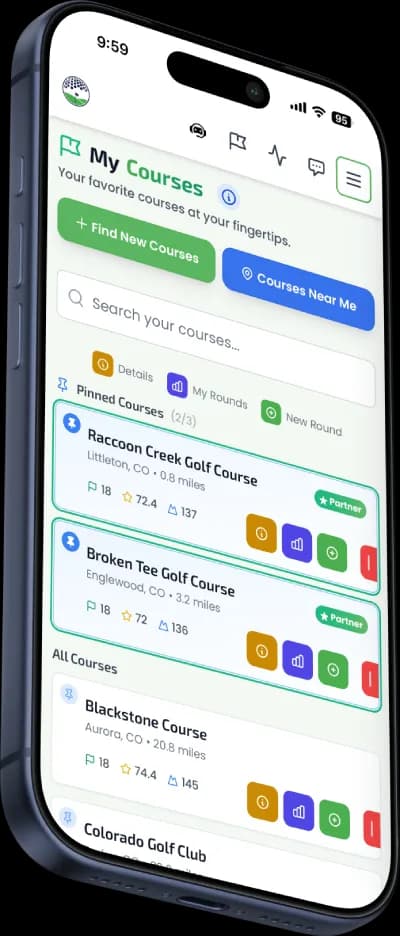
Save every course you play and claim one as your home course. Pin favorites for instant access, track your performance over time, and connect with the locals at the courses you call home. From scorecards to caddie notes to your local crew, everything about your courses lives in one place.
Get StartedFree to save courses. Premium for stats & caddie.
Explore More Features
How It Works
Build your course library and track your game at every course you play.
Find & Save
Search by name, city, or state. Discover nearby courses with GPS. Save any course to your library.
Pin Your Favorites
Pin up to 3 courses for instant access at the top of your list. Your home course is always one tap away.
Play & Track
Start rounds directly from your course card. Your stats, caddie notes, and round history build automatically.
Everything About Your Courses
From finding courses to tracking performance, My Courses has you covered.
Pin Favorites
Pin up to 3 courses for instant access. Your home course, your regular weekend spot, and that gem you just discovered.
Course Search
Search thousands of courses by name, city, or state. Find any course in seconds and add it to your library.
Nearby Discovery
Use GPS to find courses near you. Perfect for traveling golfers or discovering hidden gems in your area.
Course Details
View hole count, course rating, slope rating, Google ratings, address, phone, website, and satellite map for every course.
Course Stats
Track rounds played, average score, best score, and scoring trend at each course. See which buddies you've played with there.
Scorecard Data
Full hole-by-hole par and yardage data for Golf API courses. View the scorecard before you tee off.
Make One Your Home Course
Your home course is the one you play most. Claim it to unlock the locals community, faster round setup, identity badges, and a dedicated dashboard tile with your stats at the place you call home.
Your Home Base
A dedicated community page with your avatar over the course photo and contextual badges — Most Played, Your Crew Plays Here, recent activity from locals. The course you call home, made personal.
The Locals List
See every player who calls this course home, grouped into Your Buddies and Other Locals. Each row shows handicap and recent activity — "played 2d ago," "3 rounds this month" — so you always know who's active.
One-Tap Buddy Actions
Tap any local to invite them to a round at this course (course already selected), send a direct message, or view their profile. Connect with non-buddies right from the list.
Your Stats Here
Rounds played, average score, and best score at your home course only — surfaced as a dashboard tile so you always know how you're playing on home turf, not just overall.
Free to set. Privacy-respecting — Private profiles are excluded from locals lists.
Your Course Hub Connects Everything
My Courses is the starting point for rounds, caddie notes, stats, and more. Everything about a course is one tap away.
My Courses
Your saved courses with ratings, scorecards, and quick actions.
My Caddie
Hole-by-hole notes and strategies that build automatically as you play.
Game Plan
AI-powered pre-round strategy built from your caddie data at each course.
My Courses
Your saved courses with ratings, scorecards, and quick actions.
My Caddie
Hole-by-hole notes and strategies that build automatically as you play.
Game Plan
AI-powered pre-round strategy built from your caddie data at each course.
Tap "New Round" on any course card to jump straight into round creation with the course pre-selected. No searching again.
Your course details page links directly to caddie notes. See hole-by-hole strategies and coverage stats at a glance.
Track your scoring average, best round, and trend at each course. See which buddies you play with most and your improvement over time.
Frequently Asked Questions
How do I add a course to My Courses?
Search for any course by name, city, or state from the My Courses page. When you find it, tap "Save Course" and it's added to your library. You can also discover nearby courses using your device's location.
How do I set my home course?
Go to Profile → Edit → Home Course and tap "Select Home Course." You'll search by name (we use Google so it shows up the way it's marketed locally), then match it to scorecard data so rounds work with full stats. You only need to do this once. Your home course gets pinned at the top of /courses with an amber Home Base card and unlocks your dedicated community page at /home-course.
What is the locals list at my home course?
Every Buddies on the Green player who has set this course as their home shows up on the locals list, grouped into Your Home Base (you), Your Buddies (connected players who also play here), and Other Locals. Each row shows handicap and recent activity signals — like "played 2d ago" or "3 rounds this month" — so you can see who's active. Players whose Profile Visibility is set to Private are excluded.
Can I keep pinned courses AND a home course?
Yes — they work together. Pins (up to 3) are for quick access to courses you play often. Your home course is one dedicated course that unlocks the locals community, identity badges, faster round setup, and a dedicated dashboard tile with your stats there. Most golfers set their home course AND pin a couple of regulars.
What does pinning a course do?
Pinning a course (up to 3) keeps it at the top of your list for instant access. Pin your home course and the courses you play most often so they're always one tap away.
What course data is available?
Courses include hole count, course rating, slope rating, Google ratings, address, phone number, website, and a satellite map view. Golf API courses also include full scorecards with hole-by-hole par and yardage.
What are course stats?
Course stats (Premium) show your performance history at each course: total rounds played, average score, best score, scoring trend, last played date, and which buddies you've played with there. Track your improvement at your favorite courses over time.
How does My Courses connect to My Caddie?
When you play rounds at a course and save hole notes, those notes build your caddie playbook for that course. From My Courses, you can jump directly to your caddie notes and AI Game Plan for any saved course.
Can I start a round directly from My Courses?
Yes. Every course card has a "New Round" button that takes you straight into round creation with that course pre-selected. It's the fastest way to tee off.
Is My Courses free?
Saving courses, pinning favorites, searching, and viewing course details are all free. Course stats, caddie notes, and round history at each course require a Premium subscription.
Build Your Course Library
Save courses, claim a home course, pin your favorites, and connect with the golfers who play where you play.
Get StartedFree to save courses. No credit card needed.