
AI Scorecard Scanner
Snap a photo. Scores auto-fill. Done.
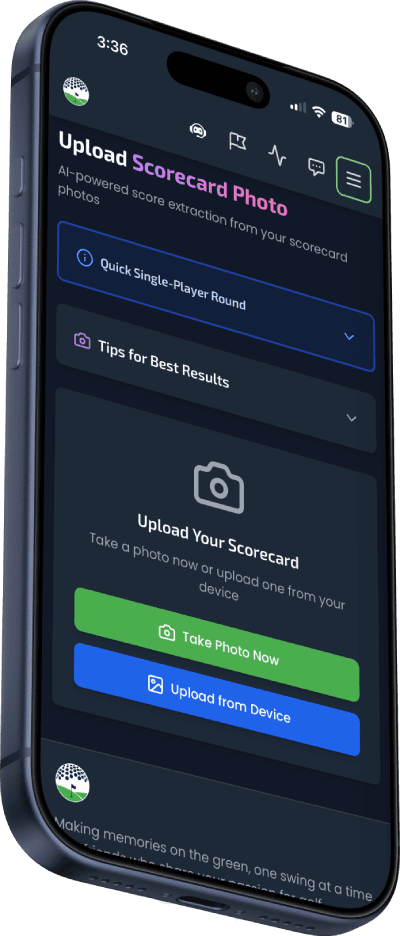
Our AI reads handwritten scores from your paper scorecard in seconds. No more typing in 18 holes of scores after your round.
Try It FreePremium feature
Explore More Features
How It Works
Three steps to digitize your round.
Take a Photo
Snap a photo of your paper scorecard. The image is compressed automatically for fast upload.
AI Extracts Scores
Google Gemini Vision AI reads every handwritten score, identifies players, and calculates totals in seconds.
Review & Save
Review the extracted scores, correct any flagged digits, select your course, and save your round.
Smart Scanning Technology
More than just OCR — built specifically for golf scorecards.
Fast Processing
AI processes your scorecard image in seconds. Images are compressed before upload to keep things fast even on cellular.
Multi-Player Detection
Reads up to 6 players from a single scorecard photo. Automatically suggests which row is yours.
Confidence Scoring
Each extraction includes a confidence level. Ambiguous digits like 4 vs 6 are flagged so you can verify.
Total Verification
Cross-checks extracted scores against handwritten OUT/IN/TOT totals to catch any misreads.
Auto Image Compression
Large images are automatically compressed before upload — fast even on slow course Wi-Fi or cellular data.
9 & 18 Hole Support
Handles both 9 and 18-hole scorecards, including flip-over style cards where back 9 is on the reverse.
Related features
Frequently Asked Questions
How does the AI scorecard scanner work?
Take a photo of your paper scorecard with your phone. Our AI powered by Google Gemini Vision reads the handwritten scores, identifies each player, and extracts hole-by-hole data in seconds. You review and confirm before saving.
How accurate is the scorecard scanning?
The AI reads handwritten scores with high accuracy and uses multiple verification methods — column alignment against printed hole numbers, digit-by-digit analysis, and cross-checking against written totals. Any ambiguous digits are flagged for your review.
Can it read multiple players from one scorecard?
Yes. The scanner detects up to 6 players on a single scorecard. Each player's scores are extracted separately, and the app suggests which row matches your account based on your name.
Does it work with 9-hole scorecards?
Yes. The scanner automatically detects whether the scorecard is 9 or 18 holes and adjusts accordingly. It also handles "flip-over" style 9-hole cards.
What if a score is hard to read?
The AI flags unclear digits with a confidence warning. You can review and correct any individual score before saving the round. Common confusions like 4 vs 6 are specifically checked.
How much does scorecard scanning cost?
Scorecard scanning is included with a Premium subscription. Each scan costs us about half a cent in AI processing, so it's essentially free to use with your subscription.
Can I still enter scores manually?
Absolutely. Scorecard scanning is just one way to log your round. You can always enter scores manually hole-by-hole, or use the scanner and then edit individual holes afterward.
Stop Typing. Start Scanning.
Turn your paper scorecard into a digital round in seconds. No more post-round data entry.
Get Started FreePremium feature. No credit card to start.