
Golf Bag Tracker
Multiple bags. Real distances. Smart gap detection.
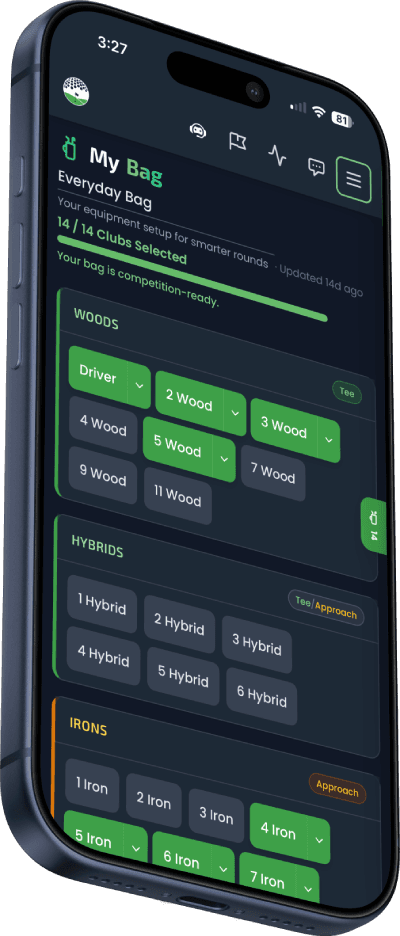
Build up to 10 named bags — Tournament, Practice, Wet Weather, whatever fits your game. Track each club's real distance and wedge loft, get instant gap detection, and see it all flow into My Caddie and Game Plan for smarter decisions on every hole.
Get StartedPremium feature
Explore More Features
How It Works
Set up your bag in minutes and get instant insights.
Add Your Clubs
Tap any club card to add it to your bag, then enter your typical distance and wedge loft for precision. Or load a standard 14-club set in one tap.
See Your Gaps
The app instantly analyzes your distance coverage and flags any gaps where you're missing yardage.
Get Suggestions
Smart suggestions tell you exactly which clubs could fill gaps and improve your setup.
What's in My Bag
Everything you need to manage your golf equipment and play smarter.
Club Distance Tracking
Record your real carry distance for every club. No more guessing whether it's a 7-iron or 8-iron from 150 yards.
Multiple Bag Setups
Keep separate bags for tournaments, practice, and weather. Switch between up to 10 named setups in two taps — your active bag is stamped onto every round.
Distance Gap Detection
Automatically identifies large gaps between clubs. A 25-yard gap between your 7 and 9 iron? You'll know about it.
Smart Suggestions
Get specific club recommendations to fill your distance gaps. Know exactly what to add or swap in your bag.
Core Club Indicators
An automatic amber dot on each category tab tells you when your bag is missing a core club — a Driver, a 7-9 iron, a PW + SW, or a Putter. No marking required.
Wedge Loft Tracking
Enter specific wedge lofts (46°, 50°, 54°, 58°, 60°) to ensure proper loft spacing through your short game.
Scoring Integration
Your bag data connects with round scoring and My Caddie notes, so your club distances are always at your fingertips.
Better Together: My Bag + My Caddie + Game Plan
My Bag isn't just equipment tracking — it's the foundation of a connected system that makes you a smarter golfer with every round.
My Bag
Your clubs, distances, and lofts. The source of truth for what you carry.
My Caddie
Hole-by-hole notes enriched with your bag data. Wedge lofts display automatically.
Game Plan
AI strategy built from your caddie data. Recommends clubs that actually work for you.
My Bag
Your clubs, distances, and lofts. The source of truth for what you carry.
My Caddie
Hole-by-hole notes enriched with your bag data. Wedge lofts display automatically.
Game Plan
AI strategy built from your caddie data. Recommends clubs that actually work for you.
When you score a round, the app shows only your bag clubs for shot tagging. Your bag name is stamped on every round — "Playing with Tournament Bag."
Your caddie notes show wedge lofts from your bag automatically — "PW (46°)" instead of just "PW." Club labels are enriched with your bag data.
Game Plan AI analyzes which clubs produced your best scores on each hole and recommends them for your next round. It only suggests clubs you actually carry.
Frequently Asked Questions
How do I add clubs to My Bag?
Open My Bag and tap any club card in the category carousel (Woods, Hybrids, Irons, Wedges, Putter) to add it to your bag. Tap the pencil icon on a card to enter brand, model, typical distance, or wedge loft. New users can also tap "Load Standard 14-Club Set" to start with a typical lineup in one tap.
What is distance gap detection?
Distance gap detection analyzes the yardage between clubs you've assigned a distance to and flags any gap of more than 25 yards. For example, if you carry a 7-iron at 155 yards and a 9-iron at 125 yards, the app highlights the 30-yard gap and suggests filling it with an 8-iron. Open the right-edge bag drawer to see every detected gap for your active bag.
Can I track wedge lofts?
Yes. For wedges, you can enter the specific loft degree (46°, 50°, 54°, 58°, 60°, etc.) alongside your distance. This helps identify redundant wedges and optimize your short game setup.
How does My Bag connect to My Caddie and Game Plan?
My Bag is the foundation of the whole system. When you score a round, the app filters club options to only what's in your bag. Those club selections flow into My Caddie as hole-by-hole notes — showing wedge lofts like "PW (46°)" automatically. Then Game Plan uses your caddie history to generate AI strategy recommendations based on which clubs actually work best for you on each hole.
What is Game Plan and how does it use My Bag?
Game Plan is an AI-powered pre-round strategy tool. It analyzes your caddie notes — which clubs you've hit on each hole and what scores they produced — and recommends the best club for every shot. Since only your bag clubs appear in scoring, Game Plan naturally only recommends clubs you actually carry.
Can I have multiple bag setups?
Yes — you can create up to 10 named bags and switch between them at any time. Tap the chevron next to your bag's name to open the bag switcher: pick a different bag, create a new one with "+ New Bag", or delete one you no longer use. Many golfers keep a Tournament Bag, a Practice Bag, and a Wet Weather Bag with different club selections. Your active bag's name is stamped onto each round you play, so you can always tell which setup you used.
What are core club indicators?
The app automatically tracks whether your bag covers each "core" category — a Driver in the Woods, at least one of 7-9 iron, both a Pitching Wedge and a Sand Wedge, and a Putter. If a category is missing its core club, an amber dot appears on its tab in the category picker so you know exactly what to fill in. No manual marking required.
Is My Bag a free or premium feature?
My Bag requires a Premium subscription. With Premium, you get full club tracking, distance gap detection, smart suggestions, and integration with My Caddie and Game Plan.
Know Your Bag. Play Smarter.
Set up your bag in minutes and never guess your distances again.
Get StartedPremium feature. No credit card to start.